

 Image 1 of 3
 Image 2 of 3
 Image 3 of 3
Find, protect and organise your family photos — without losing anything.
A simple step-by-step downloadable guide to help you work out where your photos are, protect them properly and bring scattered photo collections together.
Instant Digital Download | $7 AUD
Do you actually know where all your photos are?
Your current phone might contain thousands.
But what about your old phone?
The photos on your computer?
Google Photos?
iCloud?
That external hard drive in the cupboard?
The USBs you've kept because you're not quite sure what's on them?
And all those printed family photographs?
For many of us, years of precious family memories are scattered across different devices, accounts and storage systems.
The worrying part isn't just that they're disorganised.
It's not knowing whether everything is actually backed up — or whether some photographs exist in only one place.
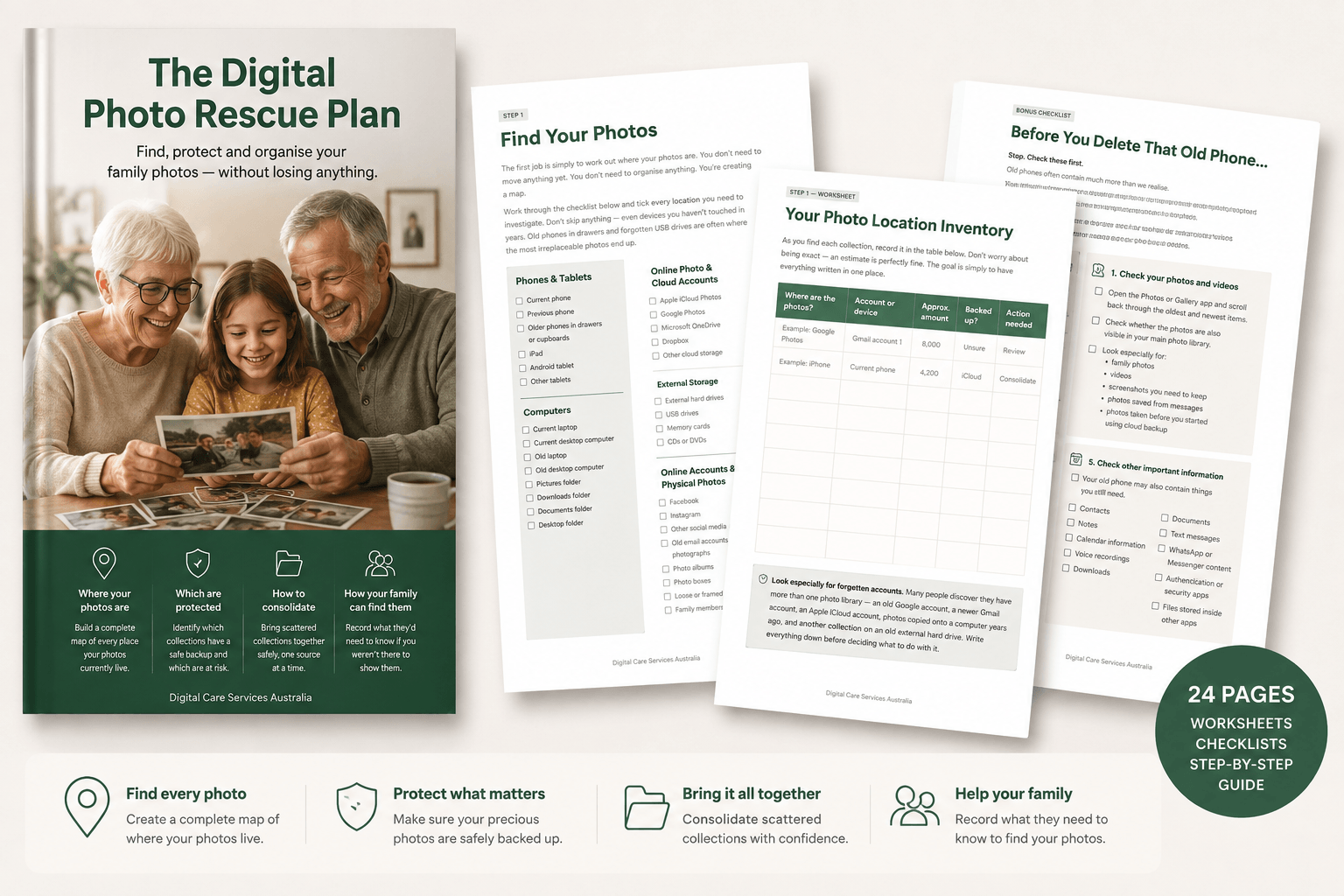
The Digital Photo Rescue Plan gives you a simple process for finding your photographs, protecting them and gradually bringing everything together.
No complicated technology.
No need to sort 20,000 photos in one weekend.
Just a calm, practical plan you can work through one step at a time.
What you'll do
The Digital Photo Rescue Plan walks you through 8 simple steps:
STEP 1 — Find your photos
Search your phones, tablets, computers, cloud accounts, hard drives, USBs, social media and printed collections.
Then use the included Photo Location Inventory to record exactly what you've found.
STEP 2 — Don't delete anything yet
Before you start cleaning up, you'll learn why deleting photos too early can be risky — particularly when cloud syncing is involved.
STEP 3 — Choose your main photo home
Understand the differences between:
iCloud Photos • Google Photos • OneDrive • Computer storage
You'll be able to consider which option makes the most sense for you without being told there's one system everybody should use.
STEP 4 — Create your backup
Create a simple backup plan so your precious photos don't exist in only one place.
STEP 5 — Consolidate
Work through old phones, computers, USBs and cloud accounts one collection at a time using the included Photo Consolidation Tracker.
STEP 6 — Deal with duplicates
Once everything is protected, you can start safely tackling screenshots, blurry photos, unnecessary files and duplicates.
STEP 7 — Organise your collection
Choose a simple system that makes sense to you — whether that's by year, event, family member or another structure.
STEP 8 — Make sure your family can find them
Record where your important photos are kept and what your family would need to know if they ever had to find them without you.
PLUS: Before You Delete That Old Phone
Thinking about wiping, selling or recycling an old phone?
Don't do it yet.
The guide includes a special Before You Delete That Old Phone checklist to help you check:
✓ Photos and videos
✓ Cloud accounts
✓ Contacts
✓ Notes and files
✓ Messages
✓ Authentication apps
✓ Your new phone
✓ Whether anything important still exists only on the old device
Because once an old device has been erased, discovering that the only copy of a precious photograph was still on it is too late.
Practical worksheets included
This isn't just something to read.
It's designed to be worked through.
You'll receive printable worksheets and checklists including:
✓ Photo Location Inventory
✓ Photo Backup Plan
✓ Photo Consolidation Tracker
✓ Family Photo Access Record
✓ Complete Digital Photo Rescue Checklist
✓ 30-Minute Photo Rescue
✓ Before You Delete That Old Phone Checklist
You don't need to organise everything today.
If you have 10,000, 20,000 or even 50,000 photographs, the idea of sorting them all can feel impossible.
You don't have to.
The first goal is simply to answer four questions:
Where are my photos?
Are they protected?
Where should they live?
Could my family find them?
Once you know those answers, organising everything else becomes much easier.
Start rescuing your family photos today
Instant digital download.
Download it, print it if you'd like, and start with just one device.
Your photos don't have to be perfectly organised.
They just need to be safe, findable and protected.
Because the photographs sitting on your devices aren't just digital files.
They're birthdays.
Holidays.
Children growing up.
Parents and grandparents.
Family homes.
Pets.
Weddings.
And hundreds of ordinary moments that may become extraordinarily important one day.
Let's make sure you don't lose them.
About Digital Care Services Australia
Digital Care Services Australia helps seniors and families bring order to passwords, online accounts, important documents and digital information — with clarity, care and a practical system families can rely on.
The Digital Photo Rescue Plan is designed to help you take one small but important step towards a more organised digital life.
Digital product: You will receive access to the downloadable Digital Photo Rescue Plan after purchase. No physical product will be shipped.
Find, protect and organise your family photos — without losing anything.
A simple step-by-step downloadable guide to help you work out where your photos are, protect them properly and bring scattered photo collections together.
Instant Digital Download | $7 AUD
Do you actually know where all your photos are?
Your current phone might contain thousands.
But what about your old phone?
The photos on your computer?
Google Photos?
iCloud?
That external hard drive in the cupboard?
The USBs you've kept because you're not quite sure what's on them?
And all those printed family photographs?
For many of us, years of precious family memories are scattered across different devices, accounts and storage systems.
The worrying part isn't just that they're disorganised.
It's not knowing whether everything is actually backed up — or whether some photographs exist in only one place.
The Digital Photo Rescue Plan gives you a simple process for finding your photographs, protecting them and gradually bringing everything together.
No complicated technology.
No need to sort 20,000 photos in one weekend.
Just a calm, practical plan you can work through one step at a time.